Switch Coding Agents When Quotas Run Out Without Losing Context
When a 5-hour limit or weekly rate limit hits in Claude Code, Codex, Gemini CLI, OpenCode, Hermes, or DeepSeek Harness, you don't have to re-explain your whole architecture to the next agent. deja handoff and automated gateway integrations carry your session state instantly.
The 5-Hour Limit Problem
Coding agents make rapid progress until they hit their usage ceiling. When you switch to a backup agent, it starts with an empty context window. Your previous debugging steps, failed hypothesis tests, and exact error traces stay locked in the old agent's transcript.
Carrying Context with deja handoff
Before closing your exhausted agent session, or right as you pivot to another harness, run:
deja handoff --to codexThis packages the active session's conclusions, open questions, and modified files into clean reference text that your new agent reads immediately.
1-Click Deep Links for CC Switch & Magpie
You can instantly provision multi-agent memory bridges across your harness ecosystem using 1-click installer protocols:
CC Switch MCP Import
To configure MCP memory servers across Claude, Codex, Gemini, and OpenCode in one action:
Magpie Gateway Integration
To hook deja directly into Magpie API gateway requests:
magpie plugin add @vshulcz/magpie-dejaWith Magpie's gateway hook active, incoming requests with a client working directory (ctx.cwd) recall matching sessions from that project locally, scrub secret patterns, and attach the excerpt to the request sent to your configured model provider.
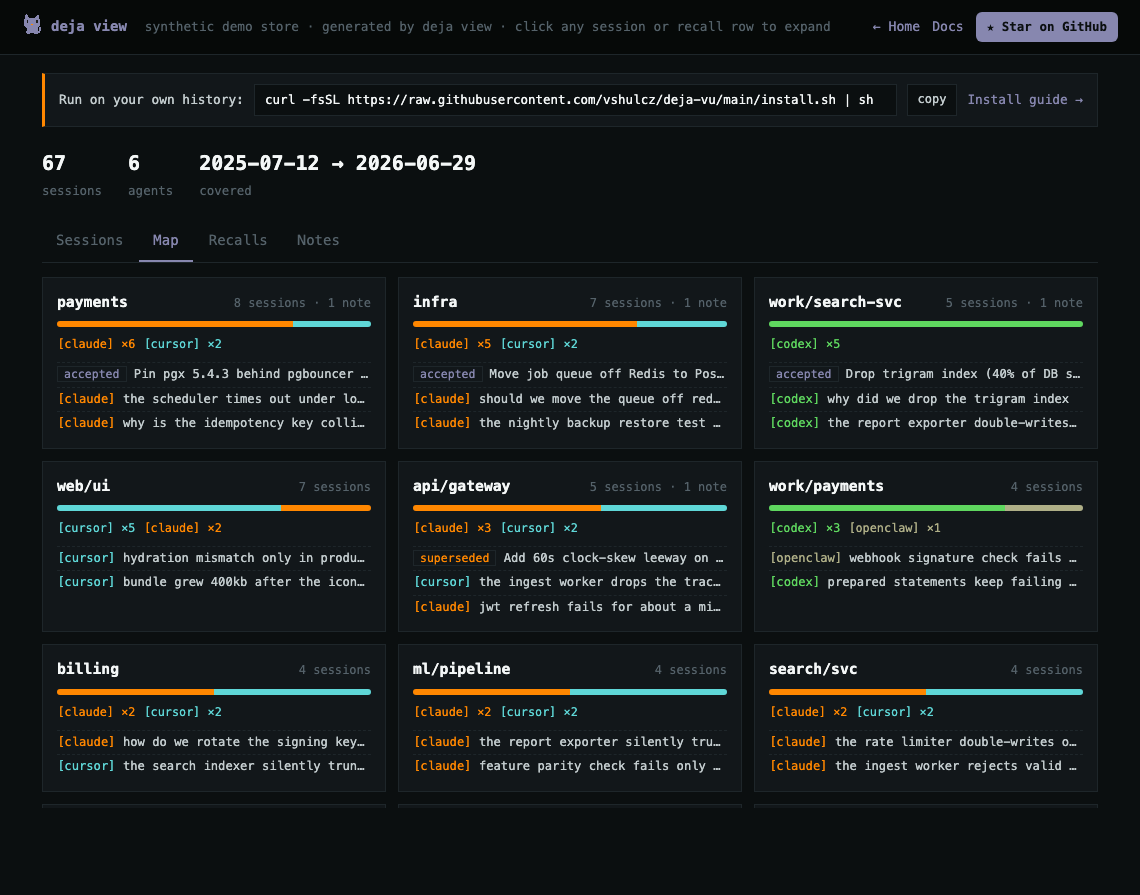
Visualizing Cross-Agent Activity with deja view
Run deja view and open the Map tab (live demo) to see which harnesses worked in each repository and which promoted decisions apply to it:
Found this useful? Star deja-vu on GitHub.