Getting started
install it, wire it in, ask your first question
deja is a single zero-dependency binary. It reads the session logs your coding agents already write, builds a local search index, and serves that memory back to the agents over MCP. Indexing and search have no network path unless you set up semantic search: after deja embed, each search also sends the query to the embedding endpoint. Otherwise what reaches the network is a command you run — deja update, deja sync ssh, the doctor version check and deja embed — plus a once-a-day look at the latest release number from a command typed at a terminal, which DEJA_NO_UPDATE_NOTICE=1 turns off. Privacy covers each one.

the same question, the same agent, once without memory and once with deja — two genuine runs against a synthetic corpus, so nobody's history is in the frame
Install
curl -fsSL https://raw.githubusercontent.com/vshulcz/deja-vu/main/install.sh | sh
# or
brew install deja-vu
npm  install -g @vshulcz/deja-vu
go   install github.com/vshulcz/deja-vu/cmd/deja@latest
The script puts the binary in ~/.local/bin. If that directory is not on your PATH yet, deja is not found in the same shell: run the next: line the script prints, which has the full path, or open a new shell once the PATH line is added.
Desktop apps that install MCP servers as bundles take the .mcpb file published with every release — one per platform, carrying the binary, so nothing else is needed. Open it and the app installs the server. Terminal agents use deja install, described under harnesses.
On Windows the install script does not run — it is a shell script and exits with unsupported OS. Scoop is the short way, and it needs no bucket added first; winget, which ships with Windows, works too:
scoop install deja-vu
winget install vshulcz.deja-vu
Otherwise take deja-vu_<version>_windows_amd64.zip from the latest release and put deja.exe on your PATH, for example in %USERPROFILE%\.local\bin.
show, ctx, blame, --json and redaction all work without it. deja install is what wires MCP into your agents and turns on session-start recall — useful, and optional. deja doctor reporting every MCP target as config missing, or not-wired where the agent is installed, is the expected state for that setup, not a fault. deja warmup leaves a skill at ~/.agents/skills/deja-search/SKILL.md teaching an agent the CLI contract, so it reaches for deja recall on its own.Search your history
Run deja on its own in a terminal. The first time, it builds the index from every agent history it finds — retroactively, including sessions from before you installed it — behind a progress view that names each agent as it is read, and lets you in once the newest sessions are searchable. Then it opens a search screen: the sessions behind your uncommitted change first, then recent ones in this project. deja install builds the index too while wiring your agents, so the first agent turn does not pay for the build.
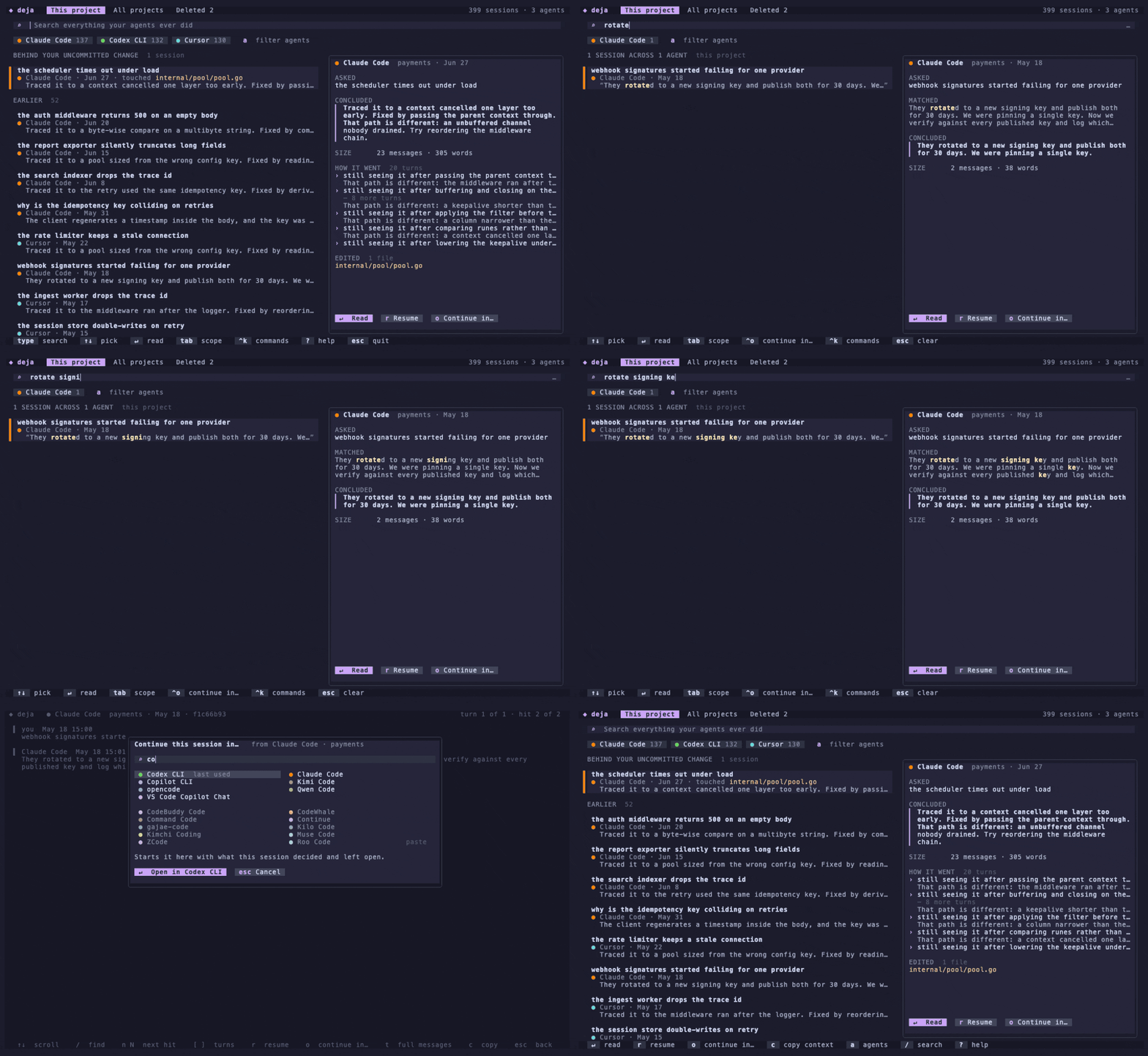
bare deja: type, read, continue somewhere else
Type and the list updates as you type. ↵ reads a session at the match, r resumes it in the agent that wrote it, o continues it in any other agent, and ? lists the rest of the keys (all of them). q leaves from the list (in the search box it is a letter), and esc steps back until it leaves from an empty box. The same search works as a plain command, for scripts and pipes:
deja "connection pool exhausted"
deja "have we dealt with jwt refresh rotation before"
deja brief prints a text summary of recent sessions instead of the screen, and DEJA_TUI=0 makes bare deja do the same.
deja index step is required — any search, recall, or install builds and refreshes the index as needed. Pass --no-index to deja install if you are scripting an install and want to defer the build. If you do keep the index warm from a shell profile or a cron entry, deja index --quiet says nothing when it worked and still reports every failure — which deja index >/dev/null does not. Exit status 3 means the index was written but some paths or lines were not read; deja doctor names them.Wire it into your agents
deja install --all      # MCP recall for every agent found on this machine
deja install --auto     # same, plus session-start auto-recall where supported
These harnesses can pull deja straight from their own plugin registry instead — same wiring, no local step:
claude plugin marketplace add vshulcz/deja-vu && claude plugin install deja-vu@deja-vu
codex  plugin marketplace add https://github.com/vshulcz/deja-vu && codex plugin add deja-vu@deja-vu
cursor-agent plugin marketplace add https://github.com/vshulcz/deja-vu
qwen   extensions install https://github.com/vshulcz/deja-vu
openclaw plugins install ./deja-vu/claude-plugin
copilot plugin marketplace add vshulcz/deja-vu && copilot plugin install deja-vu@deja-vu
/deja command and the MCP server. OpenClaw runs hooks only from its own packs — deja install openclaw-auto writes one. Copilot CLI installs the same bundle and takes only the skill from it: no hook runs and no MCP server is configured, so on Copilot use deja install copilot-auto, which writes both. The plugin stands down if deja install already wired the same hooks, so having both does not recall twice.These keep their extensions in an ecosystem of their own:
opencode plugin opencode-deja
dsh plugin --profile web add dsh-deja
openclaw plugins install clawhub:@vshulcz/openclaw-deja && openclaw config set plugins.entries.deja-vu.hooks.allowConversationAccess true
pi install npm:@vshulcz/pi-deja
hermes plugins install vshulcz/deja-vu/extensions/hermes
grok plugin marketplace add vshulcz/deja-vu
grok plugin install deja
/plugins install https://github.com/vshulcz/deja-vu   # inside Kimi Code
# Zed → Extensions → deja
deja install --auto wires these as well. The opencode and dsh packages read what the installer wrote and contribute only what is missing, and in Zed both halves register under one server id, so having both never means two servers or a tool listed twice.In a Spec Kit project, an extension adds /speckit.deja-vu.recall, which searches past sessions for the feature before you implement it:
specify extension add deja-vu --from https://github.com/vshulcz/deja-vu/releases/latest/download/deja-spec-kit.zip
After that, an agent can call recall the moment you reference past work — see Agents & MCP. Confirm the wiring any time with deja doctor.
Optional: semantic recall
If you run a local embedding endpoint (Ollama, LM Studio), deja embed adds a vector sidecar so rephrased queries still match. Without one, deja works exactly as before. See Search.
Found this useful? Star deja-vu on GitHub.